Google Analytics 4 (GA4) is a powerful analytics tool that helps businesses understand how people find and use their websites. It provides insights into website traffic, user interactions, engagement, and conversions. For digital marketers, this information is valuable for measuring campaign performance and making informed decisions.
Whether you run a business website, an online store, or a digital marketing agency, GA4 can help you understand which marketing activities attract visitors and which actions those visitors take. This beginner-friendly guide explains what GA4 is, how to set it up, how event tracking works, and how to use analytics data to improve your website.
What Is Google Analytics 4?
Table of Contents
Google Analytics 4, commonly called GA4, is Google’s analytics platform for measuring activity across websites and apps. It uses an event-based measurement model, meaning that interactions are recorded as events.
Examples include page views, scrolling, clicking certain links, submitting forms, and completing purchases. Some events are collected automatically, while others require additional configuration.
GA4 helps website owners understand user behavior without relying only on page views. It can also connect with other Google marketing tools, including Google Ads, when configured appropriately.
Why Is GA4 Important for Digital Marketing?
Digital marketing involves more than attracting visitors. Businesses also need to understand what visitors do after arriving on a website.
GA4 can help you:
- Measure website traffic and engagement.
- Understand which channels bring visitors to your website.
- Identify popular pages and content.
- Track important actions such as leads and purchases.
- Compare marketing performance over time.
- Discover where visitors may be leaving the customer journey.
For example, if visitors arrive from a Google Ads campaign but rarely submit a form, you can investigate the landing page, offer, audience, and form experience. Analytics helps identify patterns, although it does not automatically explain every reason behind user behavior.
How to Set Up Google Analytics 4
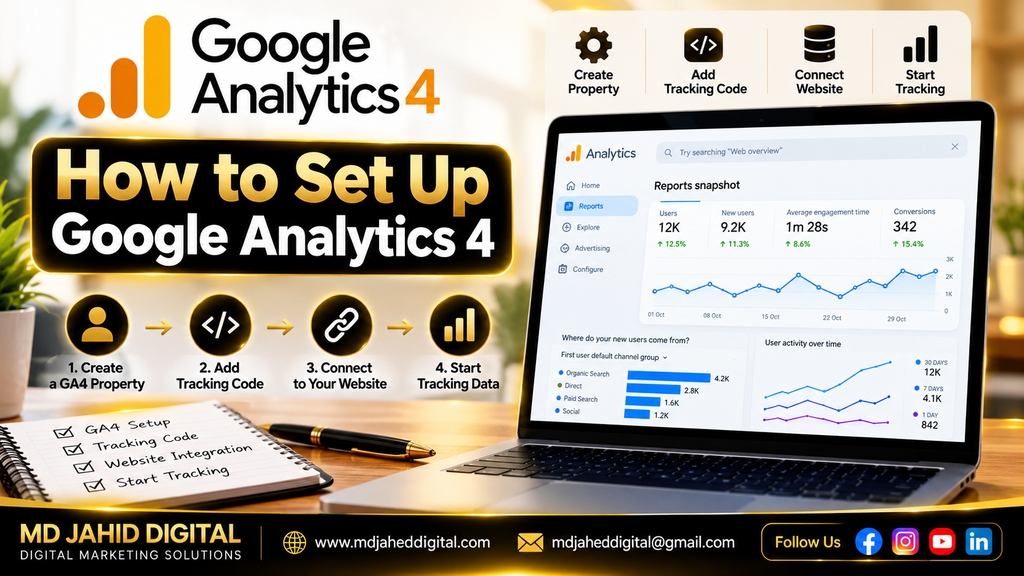
Follow these practical steps to begin measuring your website.
Step 1: Create a GA4 Property
Sign in to Google Analytics using your Google account. Create or select an Analytics account, then create a GA4 property for your website. Enter the property name, reporting time zone, and currency that match your business needs.
Step 2: Create a Web Data Stream
Inside your GA4 property, open the data collection settings and create a web data stream. Enter your website URL and a suitable stream name.
GA4 will provide a Measurement ID that identifies the web data stream. Keep this ID private from unnecessary public sharing, and use it when configuring your website integration.
Step 3: Connect GA4 to WordPress
If your website uses WordPress, you can connect GA4 through a suitable integration, such as Google’s official Site Kit plugin, or through Google Tag Manager.
Choose one clear implementation method and check for existing tracking code before installing another. Duplicate tags can lead to inaccurate reporting.
Step 4: Verify Data Collection
After installation, open GA4’s Realtime report and visit your website in another browser tab. Check whether your activity appears. You may also use DebugView to inspect events during testing.
Data may not appear immediately in every report. If nothing appears, check the Measurement ID, tag installation, consent settings, browser extensions, and whether another plugin is interfering with tracking.
Understanding GA4 Events
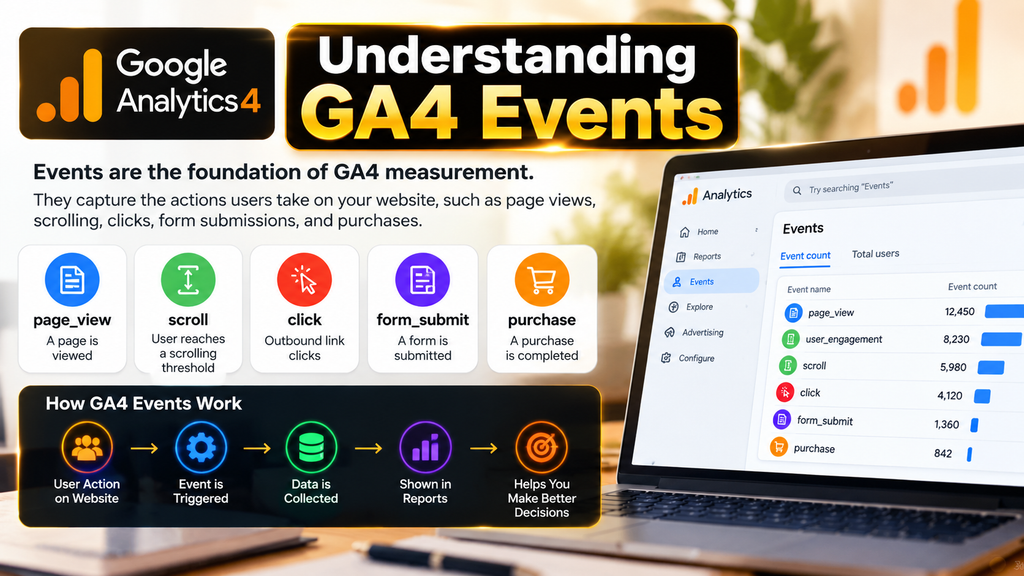
Events are the foundation of GA4 measurement. They describe actions users take on your website.
Common examples include:
page_view: A page is viewed.scroll: A user reaches a configured scrolling threshold when enhanced measurement is enabled.click: Certain outbound link clicks may be measured through enhanced measurement.generate_lead: An event commonly used to represent lead generation when configured.add_to_cart: A product is added to a shopping cart.purchase: A completed purchase is recorded when the event is correctly implemented.
Not every event is automatically collected. Some require enhanced measurement, custom event configuration, or website and ecommerce integration. Use event names and parameters that accurately represent what happened.
How to Track Leads and Conversions in GA4
First, decide which actions matter to your business. A service provider may focus on qualified lead submissions, while an online store may prioritize completed purchases.
For lead tracking, configure an event to fire after a successful form submission. For ecommerce tracking, implement the appropriate events and send accurate transaction values and currency.
Next, open the Events section in GA4 and verify that the events arrive correctly. Mark the important events as key events so you can analyze them as meaningful business outcomes.
Avoid counting a form button click as a successful lead if the form was never submitted. Similarly, do not count a checkout visit as a completed purchase.
For more detail on measuring advertising outcomes, read our related guide: Conversion Tracking in Digital Marketing: A Beginner’s Guide. Add an internal link to that article on your website.
How to Analyze GA4 Reports
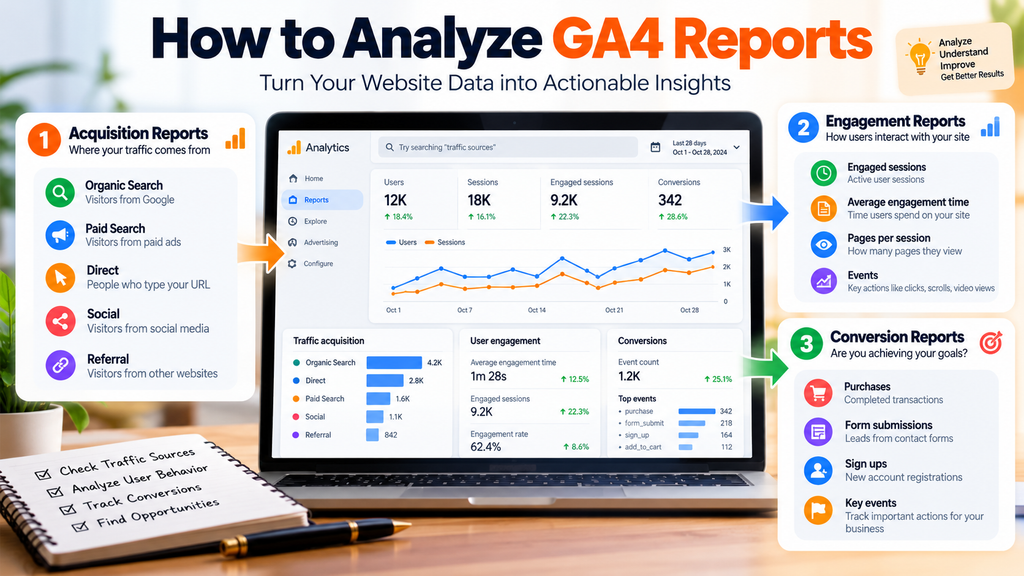
Once data collection is working, use GA4 reports to understand website performance.
Acquisition Reports
Acquisition reports help you understand where visitors come from, such as organic search, paid advertising, social media, referrals, or direct visits. Proper campaign tagging with UTM parameters can help distinguish marketing campaigns.
Engagement Reports
Engagement reports show how people interact with your website. Review engaged sessions, engagement time, and the pages or screens people visit to understand which content attracts attention.
Landing Page Analysis
Landing page analysis helps you compare the pages where visitors first arrive. Look at traffic, engagement, and key events together rather than judging a page by visits alone.
Conversion and Key Event Analysis
Use key event reports to understand which traffic sources and campaigns contribute to important actions. Remember that GA4 attribution and the reporting methods used by advertising platforms may differ, so their totals may not match exactly.
How GA4 Helps Improve Marketing Performance
Analytics data is most useful when it informs practical decisions.
If organic search brings engaged visitors, review which pages attract them and create helpful related content. If a paid campaign attracts traffic but few conversions, examine the audience, ad message, landing page, and conversion setup.
If mobile visitors struggle to complete a form, test the mobile layout and simplify the process where appropriate. If an ecommerce store receives add-to-cart events but few purchases, review shipping costs, checkout usability, payment options, and tracking accuracy.
Make changes based on reliable data, then measure the results over time. Avoid making major decisions from very small samples or a single day’s performance.
Common GA4 Setup Mistakes
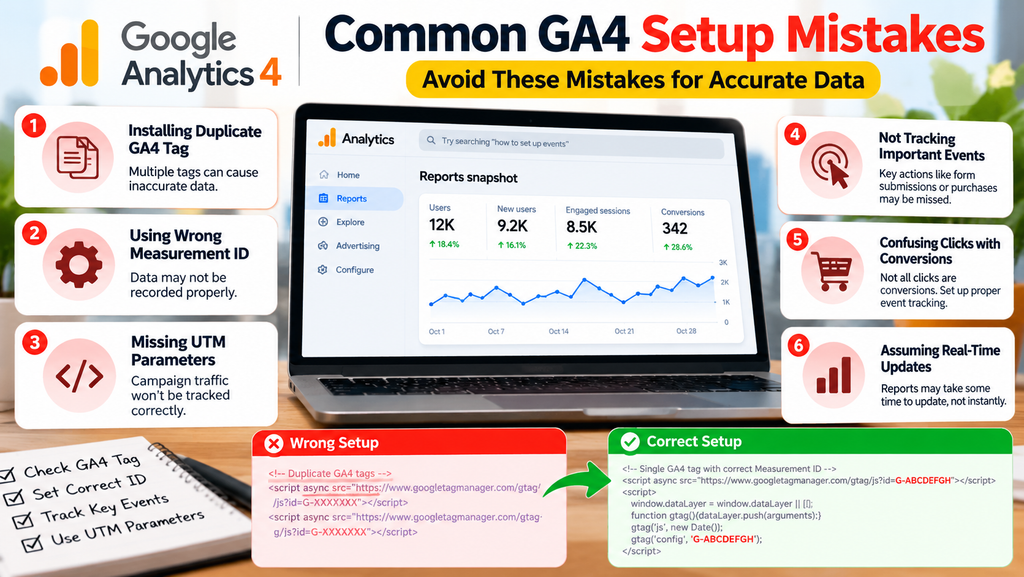
Some common mistakes include installing duplicate tags, using the wrong Measurement ID, failing to configure important events, and recording purchases with incorrect values.
Other problems include missing campaign UTM parameters, confusing clicks with completed conversions, and assuming that all reports update instantly.
Check your implementation after changing themes, plugins, forms, checkout pages, or tag settings. Test important events regularly and follow applicable privacy and consent requirements. Do not send passwords, payment card information, or other sensitive personal information to Google Analytics.
Conclusion
Google Analytics 4 helps businesses understand website traffic, user engagement, and important customer actions. By setting up GA4 correctly, configuring relevant events, and reviewing reports regularly, digital marketers can make better decisions about SEO, advertising, content, and website usability.
Start with accurate data collection, test your key events, and focus on the actions that matter to your business. GA4 is most valuable when you use its insights to improve the customer experience and measure meaningful results.
Leave a Reply